
ZDNET’s key takeaways
- Private Intelligence can now analyze your Pockets transactions.
- When you join Pockets, you need to use Seek for spending recommendation.
- The characteristic can’t transfer or spend any cash.
Google has added Pockets integration to Private Intelligence in AI Mode, letting you find out about your spending habits, plan a price range, maximize bank card rewards, and extra with a easy Search.
Beginning at this time, Google introduced, Private Intelligence for Search is increasing to extra apps, together with Pockets and Drive. Google can’t transfer or handle any cash, nevertheless it can provide you tailor-made, customized search outcomes about your funds, like exhibiting the place you spend probably the most, figuring out recurring subscriptions you won’t pay attention to, and suggesting which bank card is likely to be greatest to make use of for journey. All you must do is ask in a search.
Additionally: I attempted Private Intelligence in Android Auto – and it knew precisely the place I needed to go
This characteristic comes simply over per week after Google launched Private Intelligence to Pockets.
Learn how to use Private Intelligence to investigate your spending
To activate the characteristic, go to https://gemini.google.com. When you’re there, click on on the Settings gear icon, after which “Private Intelligence.” Select “Related Apps,” and also you’ll see all obtainable apps. Once you select Pockets, you would possibly have to log in to your checking account to entry it totally.
As soon as your Pockets is linked, it takes a couple of minutes to totally sync. As soon as it’s completed, you may ask questions by way of AI mode in Search.
Private Intelligence tells me what I don’t wish to hear
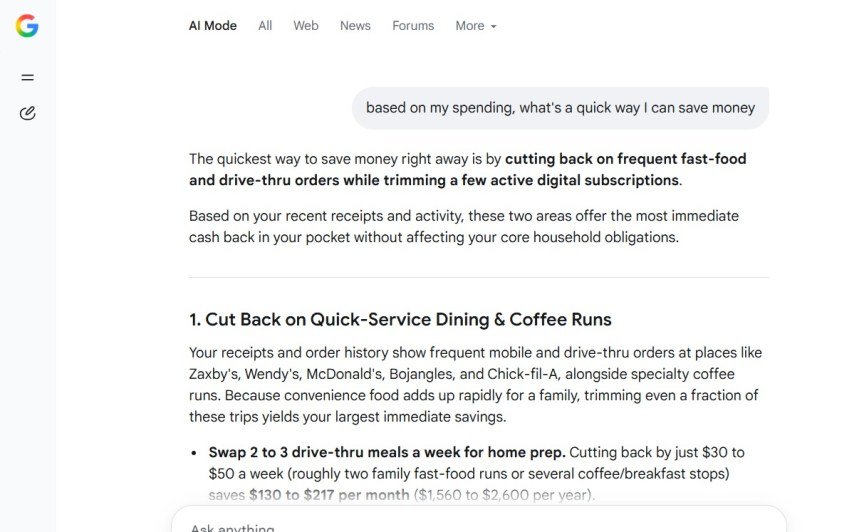
I made a decision to provide it a attempt for myself, beginning off with a easy question: “Based mostly on my spending, what’s a fast means I can get monetary savings?” I may have informed you one of many major culprits, however Google fortunately responded with what I already knew: far an excessive amount of of my cash goes to quick meals and low.

“You steadily seize quick-service meals,” the response stated, stating a number of quick meals locations that I do certainly frequent, “and specialty coffees all through the week.” If I simply reduce that down to 2 meals and two coffees per week, Gemini defined, I’d save about $30 per week, or $1,500 a yr.
Additionally: This highly effective Gemini setting made my AI outcomes far more private and correct
After I requested it to search out recurring subscriptions, Gemini famous that I had a number of month-to-month costs. What I didn’t ask for, nevertheless it did, was to interrupt down these subscriptions into an easy-to-see chart, full with the identify, worth, class, the cardboard it’s being charged to, and the timeframe it normally comes out. Gemini even supplied a couple of free options to providers I used to be paying for.
Since Gemini additionally is aware of what playing cards are linked to your Pockets, it’s in a position to provide recommendation there, too. I’m planning a visit to New York Metropolis, so I requested which playing cards is likely to be greatest to make use of for the inns and airfare. Gemini was in a position to analyze my card advantages, contemplating issues like rewards and built-in journey insurance coverage, and make a advice.
Additionally: Sluggish Android cellphone? Learn how to pace it again up in 4 straightforward steps
Whereas Gemini Private Intelligence can entry your Gmail to study extra about your spending, it could actually’t entry your checking account. The one info it is aware of about your funds and spending comes from receipts in your inbox or out of your Pockets transaction historical past. I do use Pockets usually (principally when ordering by way of on-line apps), nevertheless it’s not fairly my go-to choice once I’m in a retailer. Given how helpful this characteristic may be, although, I’d simply begin utilizing Pockets extra to provide it extra info to work with.

See full bio